Local Engine
Run security tests locally — no login, no account, no network calls to Humanbound. Full isolation with your own LLM provider or ollama for completely offline testing. The engine runs the same orchestrators, attack strategies, judge, and posture formula as the hosted platform; the only difference is that results stay on your machine in .humanbound/results/.
How It Works
The local engine runs the same orchestrator, attack strategies, judge, and posture formula as the platform. The only difference: results stay on your machine.
hb test --endpoint ./config.json --scope ./scope.json --wait

  ✓ Experiment created
  ✓ Posture: 64/100 (Grade C)
  ✓ Results saved to .humanbound/results/
Architecture
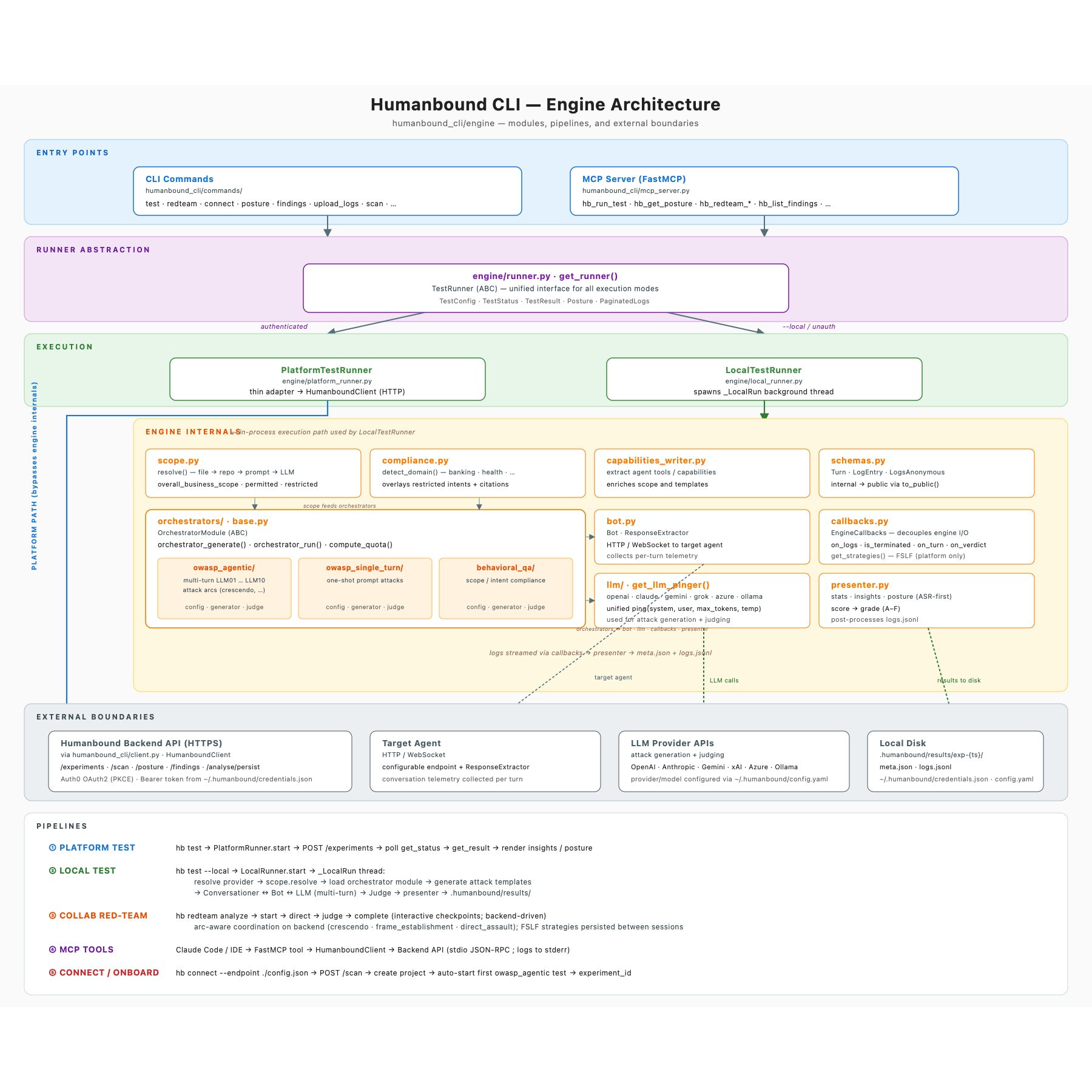
Every entry point — hb commands and the MCP server — goes through a single
TestRunner abstraction. The PlatformTestRunner forwards to the Humanbound
backend; the LocalTestRunner drives the in-process engine — scope discovery,
orchestrators (OWASP agentic / single-turn / behavioral QA), bot, LLM
provider, judge, and presenter — against your own LLM provider, writing
results under .humanbound/results/.
What You Get Locally
| Feature | Local | Platform |
|---|---|---|
| Multi-turn adversarial testing (OWASP) | Yes | Yes |
| Behavioral/QA testing | Yes | Yes |
| Posture score (0-100, A-F) | Yes | Yes + trends |
| Conversation logs | Yes | Yes |
| HTML/JSON reports | Yes | Yes |
| Guardrails export | Yes | Yes (richer) |
| Firewall training | Yes | Yes (richer) |
| Cross-session leakage detection | No | Yes |
| Finding lifecycle | No | Yes |
| Posture history | No | Yes |
| Continuous monitoring | No | Yes |
| Managed LLM | No | Yes |
Quick Start (Local)
# Install
pip install "humanbound[engine]"

# Configure LLM provider
export HB_PROVIDER=openai
export HB_API_KEY=sk-...

# Or use ollama (full isolation)
export HB_PROVIDER=ollama
export HB_MODEL=llama3.1:8b

# Run test
hb test --endpoint ./bot-config.json --scope ./scope.json --wait

# View results
hb posture
hb logs
hb report -o report.html
hb guardrails -o rules.json
When to Use Local vs Platform
Use local when:
- You want to evaluate before creating an account
- Your security policy requires full isolation (no external calls)
- You're in CI/CD and want a self-contained test
- You're developing a custom orchestrator
Use platform when:
- You want posture tracking over time
- You need finding lifecycle (open/stale/fixed/regressed)
- You want continuous monitoring (ASCAM)
- You want a managed LLM (no API key needed)
- You need team collaboration
Switching is seamless — hb login, then the same commands produce richer output.